 | |
| |
Portfolio Samples |
| |  The Ed-Tech Creations portfolio includes work in the 3 categories described below. The samples reflect a variety of styles and tones, layout arrangements, and a wide range of media elements. The Ed-Tech Creations portfolio includes work in the 3 categories described below. The samples reflect a variety of styles and tones, layout arrangements, and a wide range of media elements.
Client Products  | | | | Photo Processing - Icicle Panorama
The icicle panorama is a sample of both image enhancement and conversion. A vacationing client captured the beautiful mountain view in a series of 3 digital photos. Ed-Tech Creations stitched the photos together and resized the combined image as requested. | | | | | | | | Custom Graphic - Navigation Bar
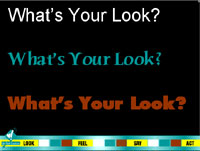
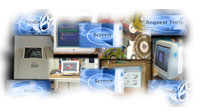
The custom navigation bar shown in this sample screen was developed by Ed-Tech Creations for its own use when presenting design options to clients. Within three areas, colored buttons on the bar were consistently used to identify the level of layout, style, and media. This intuitive bar makes accessing the most appropriate sample easy and quick. The navigation bar was developed for use in both PowerPoint and Flash. | | | | | | | | Custom Graphic and Animation
Ed-Tech Creations initially developed this icon in Fireworks to put a face on the concept of a superhero who organizes and presents media components to facilitate learning. Named The Mediator™, this figure was later animated in Flash and synchronized with sound effects to introduce the interactive software modules that bear his name. The concept successfully engaged the high school students who eventually worked on variations of the animation and developed the accompanying media files, as well as those who used the final product. | | 
| | | | | | Custom Graphic - Screen Icons
To create a user-friendly interface, Ed-Tech Creations planned and developed these "you are here" screen indicators. The icons were created in Fireworks during construction of a specific The Mediator™ learning module for high school science students. The first icon symbolizes the module topic—translational motion. The next four icons represent the subtopics—rate, acceleration, math lab, equipment lab. The module icon and current topic symbol are always on the screen to visually help users know exactly where they are when using the software interface. | | | | | | | | Digital Video Clip
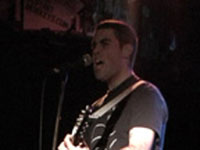
This is a still frame from a digital video clip of a live musical stage performance. After filming the performance, Ed-Tech Creations captured, edited, and compressed the resulting video to produce small clips and extracted audio suitable for the client's Web site. | | | | | | | | Custom Video
Ed-Tech Creations constructed a promotional video clip to illustrate custom video work to high school classes. Selections from two 20-minute videos were sequenced and edited to produce an exciting 1:42 minute demo. The results show how special it can be to capture those high school memories that can't be placed on a yearbook page. Various still images, tones, transitions, and audio effects were used to acquaint students with editorial options available to them. | | 
| | | | | | Single-Page Flyer
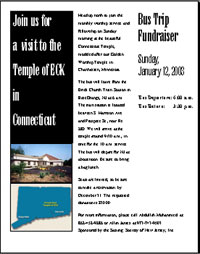
Ed-Tech Creations was asked to create an interesting flyer for an upcoming event. The client wanted more than the usual centered text and graphic that they had been creating on their own. The results were successfully used in a mailing campaign and posted in local stores. | | | | | | | | Multiple-Page Program
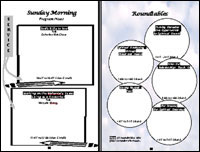
Stretching Word to its desktop-publishing limit, Ed-Tech Creations designed the layout and developed all graphics for a 20-page seminar program. This double-page spread represents one of several workbook style pages that the client wanted. The final program was aesthetically pleasing, informational, and useful to attendees. | | | | | | | | Display Ad
This is one of several display ads developed for a non-profit organization and printed in local newspapers. Ed-Tech Creations maximized the impact of the client's words within given budget limits and their request for conservative styling. | | | | | | | | Custom Print Format
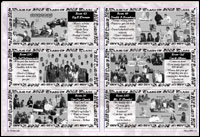
Serving as technical trainer and editor-in-chief, Ed-Tech Creations guided a team of high school students to produce two exciting theme-based yearbooks. Both volumes creatively maximized student photos in the available page space. This sample double-page spread is from the many custom layouts that were designed and developed in desktop publishing software. All pages adhered to the printer's strict graphic specs and were carefully edited to ensure error-free text. | | | | | | | | Disk-Based Tool - The Mediator™ Custom Module
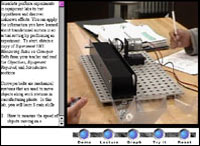
This is a sample topic screen from one of Ed-Tech Creations' multimedia learning modules known as The Mediator™. After designing and programming the product structure, the media components were customized for the client's module selection—translational motion. Each of four subtopics allows users to click a media bar that appears under the visual display to choose the related media presentation they would like to see. "Demo" starts an animation or video clip. "Lecture" plays a narrated video, still graphic, or animation. "Graph" displays a still or animated graph. "Try It" permits manipulation of on-screen variables to solve a sample problem or previews an experiment to try on one's own. "Reset" returns to the initial visual display. | | | | | | | | Educational Web Presence
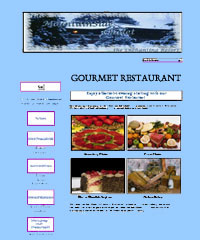
Ed-Tech Creations interviewed the principal and coordinating teachers of an elementary school to help them develop their first school Web site. The group wrote text and photographed projects and students, while Ed-Tech Creations developed custom graphics and coded simple Web page layouts that would be easy to update. The home page for the initial site is shown. | | | | | | | Instructional Materials | | | | Handout & Custom Animation
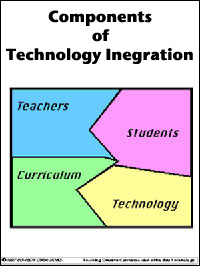
This integration puzzle was initially created by Ed-Tech Creations as a handout and overhead slide for a teacher workshop. It was later converted to an animation to more clearly illustrate that teachers, students, curriculum, and technology are all important pieces in any successful program to integrate technology. The stronger impact of the animation helped assure teachers that they played a vital role in the process. | | | | | | | Handout & Animated Concept Demo
The rungs on this ladder represent the increasing levels of integrating technology—independent student tool, teacher demo, class productivity tool, interactive process, and creative environment. Ed-Tech Creations developed the concept and image as a handout, overhead slide, and computer animation. They were then used successfully in teacher workshops to communicate the concept that moving up the ladder increases the degree to which students, teachers, and curriculum are integrated in a technology plan. | | 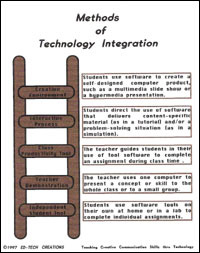
| | | | | | T.A.P.—Technology Application Plan™
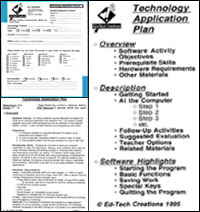
Ed-Tech Creations developed the concept of a Technology Application Plan to help teachers easily identify, document, and use the technology resources in their own educational settings. Each plan highlights features from both standard lesson plans and software manuals. Shown are the form used to identify needs and resources, the general outline for all T.A.P. plans, and the first of a 6-page plan developed for a high school art history class. Students in the class used the Microsoft Art Gallery CD-ROM as an individual exploration and research tool. | | | | | | | | Structured Project Model
Shown are 4 of 5 scenes from a model hypermedia product for a middle school project on famous scientists. The teacher wanted specific topics included in each student's presentation—early life, influences & obstacles, and accomplishments. Not shown is the final credits screen, citing bibliographic resources for all content and media. After viewing the interactive software model, students created and presented their own version, using the given structure, but supplying their own information, graphics, and audio. Ed-Tech Creations' structured models can be used as visual guidelines or starting files; they can be adapted to hypermedia presentations or linear slide shows. | | 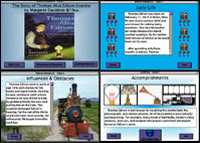
| | | | | Freeform Project Model
Designed for more freeform digital projects on any topic, models, such as Planet Pluto on the right, consist of sample flowcharts, screen layouts, and scripts (for both text and audio). Planet Pluto has been developed many times in grades 4-12 and by teachers in Ed-Tech Creations' inservice workshops. Duplicating this specific model helped all participants reinforce software techniques and prepare for the process of planning and developing their own individualized product. | | 
| | | | | | Standard How-To Guideline
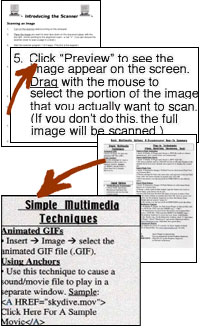
Standard "How-Tos" are concise documentation that is given to students, workshop participants, or coaching clients. Ed-Tech Creations writes these guidelines to provide very specific, step-by-step instructions on how to perform software operations, always customized to the given hardware platform and software version. The scanning guideline on the top right was used by all 15 classes who worked in an elementary school's computer lab. The "How-To" summary below that was used in a high school multimedia lab to add audio, animations, and video to Web sites. | | | | | | | | How-To Visual Organizer
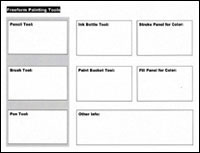
Ed-Tech Creations also offers "How-To" guidelines in the form of open-ended visual organizers that help students construct their own knowledge. High school students studying Macromedia Flash art and animation used this sample "Freeform Painting Tools" organizer to record notes and summarize their own hands-on explorations of the software. Additional one-page organizers were also created for learning the basic drawing tools, using the pen tool, and working with the library and symbols. | | | | | | | | Process To-Do Checklist
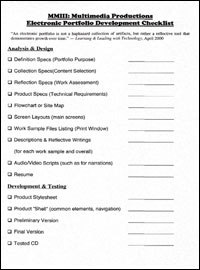
Ed-Tech Creations recommends and supplies "To-Do" checklists to help clients learn all phases of the software development cycle—analysis, design, programming, testing, and implementation. Here is a sample that helped students and teachers identify, keep track of, and complete the required tasks to create electronic portfolios. All deliverables are listed within the appropriate project phase, with room to indicate completion dates, grades, or other brief notes. Checklists help clarify the steps in any process and are particularly popular for long-term projects, such as the portfolio. | | | | | | | | Technical To-Do Checklist
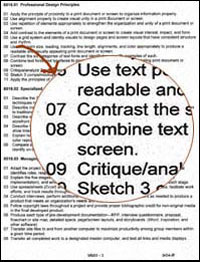
Highly technical work, such as designing and developing Web pages, can also benefit from "To-Do" checklists. Ed-Tech Creations summarized a 397-paged high school classroom resource book (Designing Web Usability by Jakob Nielsen). The resulting 12-page checklist helped instructors and students to clarify the large volume of information on the topic as they worked on designing Web sites to promote businesses. Recommended techniques are organized in the 21 topics shown on the right, making it easy to focus on only one or several areas at a time. All checklist guidelines are stated as positive actions—what to do (vs. what not to do) to reinforce good technical habits. The first informational page of the checklist is also shown. | | | | | | | | Custom Workshop Curriculum
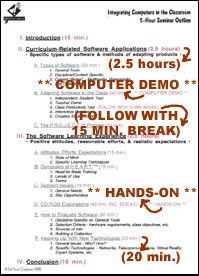
Whenever Ed-Tech Creations agrees to deliver a custom workshop, we first develop a curriculum that meets both the client and audience needs. This sample document is the resulting overview of a 5-hour workshop delivered to professors at a county college to promote the integration of technology. Note the attention to specific topics, varied instructional methods, carefully planned timeframes, and hands-on experiences. The format of the curriculum document itself is designed to help the workshop presenter deliver the planned event. | | | | | | | | District Technology Curriculum
This sample document is part of project that illustrates curriculum writing at all levels—district program overview, course topics, unit objectives, and lesson plans. Ed-Tech Creations wrote all aspects of the curriculum for a new 9-12 multimedia program in a vocational technical high school, producing 4 district documents totaling 29 pages. Measurable, behavioral objectives are stated for all units. Many daily lessons plans were also written to support the program, which was implemented in 1999 and successfully continues today. | | | | | | | | Online Help
When writing online help systems, Ed-Tech Creations keeps text brief without sacrificing necessary information. The example is a portion of the help written for The Mediator™ Translational Motion CD-ROM module, an interactive instructional tool that uses multiple media forms to introduce, review, reinforce, and extend selected topics. Headings, such as "Using the Menu Bar" help users quickly scan to the directions they need. Onscreen buttons and references are precisely identified, and all help instructions are tested thoroughly before being finalized in a software product or Web site. | | | | | | | Training Results | | | | Composite Image
Using PhotoShop imaging software, Ed-Tech Creations taught students to apply selection tools and layer techniques to combine several images into one meaningful display. This is one tenth grader's composite image created for the home page for a computer technology class. | | | | | | | | Animated Banner Ad
Ed-Tech Creations developed lessons and demos to help high students learn various Flash animation techniques, including shape tweening, motion tweening, guided motion, masks, and frame-by-frame animation. These images represent one student's frame-by-frame animated banner ad. | | | | | | | | Video Digitization and Conversion
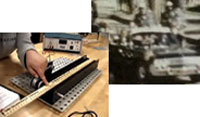
While working on software development projects, Ed-Tech Creations gudied students to capture and edit video from multiple sources. The scene on the right was converted from an educational VHS tape; the scene on the left is from original filming of a science experiment. Using appropriate settings, the video clips were successfully compressed and incorporated in the class projects. | | | | | | | | Digital Video Clips
The four digital video clips illustrated in the scenes to the right were developed by an 11th grade student who participated in an Ed-Tech Creations workshop on the four principles of design—proximity, alignment, repetition, and contrast. Since participants were taught to "P.A.R.C. it right" when placing elements on a page or screen, the student used a parking lot visual metaphor to illustrate the design principles. Each concept model was animated in Flash and then converted to video format. The results were then incorporated in an instructional learning simulation where the user had a chance to attend a seminar (to learn) or go to work at the parking lot (to apply the concepts). | | 
| | | | | | Desktop Published Newsletter
Students in grades 4-12 were instructed by Ed-Tech Creations to use columns, headers and footers, page numbers, and word wrap to produce newsletters and magazines. Consistent style sheets were always required. This example is from a 21-page high school team project titled, "Tech Media Times." | | | | | | | | Multiple-Page User Manual
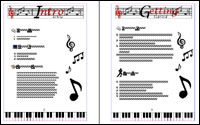
This technical writing sample shows a double-page spread from a student's user manual—an 8-page document created for the student's educational software game about musical notes. Ed-Tech Creations required all user manuals to have four sections—introduction, getting started, using the program, and reference. Within each section, students chose appropriate features, such as how-to guidelines, tutorials, walkthroughs, activities, features & functions lists, shortcuts, and troubleshooting. | | | | | | | | Multimedia Slide Show
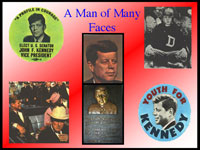
High school students studying with Ed-Tech Creations captured related digital media in a variety of ways—scanning images, taking photos with digital cameras, and importing disk-based clip art. The images were arranged on this screen and others as part of a PowerPoint slide show presentation on "The Influence of John F. Kennedy on our Lives." | | | | | | | | Hypermedia Presentation
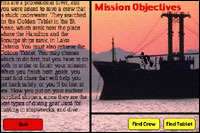
During one of Ed-Tech Creations' C.H.A.M.P.S.™ workshop, a ninth grade student designed and developed this screen as part of an interactive, hypermedia software product about a shipwreck. The complete product integrates facts and story to allow the user to choose multiple paths and outcomes in this 14-screen adventure. | | | | | | | | Interactive Multimedia & Original Art
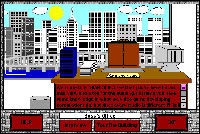
The work of another high school student in an Ed-Tech Creations' C.H.A.M.P.S.™ workshop featured original digital art on every screen, such as in this sample image. Viewers of this interactive multimedia tool move from office to office in a simulation of a job interview. Sophisticated navigation options and transition animations create a sense of reality in the experience. | | | | | | | | Custom Video DVD
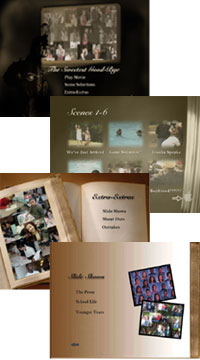
Cumulating three years of multimedia study and project work, a team of high school seniors produced an interactive digital version of special senior memories. Directed by Ed-Tech Creations, the students designed the DVD structure—illustrated in the menu screens to the right—and developed and edited all media. The final "2005-The Sweetest Good-Bye" product included a 15-minute main video of the senior prom and picnic, plus extras—2 additional videos of shout outs (8:44) and outtakes (3:06) and slide shows featuring 224 photographs of school life, the prom, and younger years. Custom music clips were created to accompany all sections, and the final DVD was burned for distribution. | | | | | | | | Business Web Presence
Whether creating Web pages for business, educational organizations, or personal use, Ed-Tech Creations spends as much time analyzing client needs and designing the appropriate site structure and style as actually developing the pages. 11th grade workshop participants followed these guidelines to produce user-focused Web sites for fictitious businesses. The sample is an interior page from a student's Web site for a New England resort. All sites used advanced features such as external CSS style sheets, assistive technologies (templates and library items), forms, Javascript rollovers, layers and DHTML animation, and plug-in technologies (for Flash animations or QuickTime movies). | | | | | | | | CBT Tutorial & Assessment
Ed-Tech Creations designed and wrote text for this interactive learning module, "Crop, Size, and Optimize." After creating the icons, music/vocals, and animations, a high school junior structured menus and built the screens for this standalone CD-ROM product. Shown are 2 screens from the final product, which was successfully used to teach and reinforce these multimedia techniques to other students. The top image is one of 4 tutorial screens in which students read and click to view an animated demo of the presented topic. The bottom image is from the assessment portion of the module. After being given a real-life multimedia lab scenario, users check their skills by answering 10 questions on when to crop, size, and optimize graphics and other media. | | 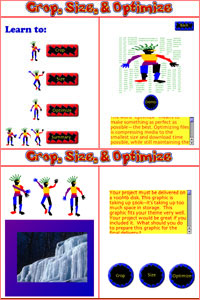
| | | | | | | 
| |